Website

Website

B To B

B To B

Management Dashboard

Management Dashboard

Streamlining Educator Workflows in a B2B Dashboard

Streamlining Educator Workflows in a B2B Dashboard

Eduvista is a B2B educator dashboard that helps teachers and specialists monitor students’ emotional and behavioral well-being. I redesigned the Student View experience to help educators quickly identify at-risk students, understand what the data means, and take the next step through AI-generated teaching strategies, referral workflows, and printable student reports.

Eduvista is a B2B educator dashboard that helps teachers and specialists monitor students’ emotional and behavioral well-being. I redesigned the Student View experience to help educators quickly identify at-risk students, understand what the data means, and take the next step through AI-generated teaching strategies, referral workflows, and printable student reports.

Context

Context

Eduvista combines neuroscience-based learning activities with behavioral check-ins. Students interact with the product on the front end, while educators use the dashboard to review emotional and behavioral data in the back office.

The original Student View contained valuable data, but the experience was difficult to act on. Teachers could see scores, charts, and student status indicators, but the interface did not clearly guide them toward the most important question:

Who needs my attention first, and what should I do next?

Eduvista combines neuroscience-based learning activities with behavioral check-ins. Students interact with the product on the front end, while educators use the dashboard to review emotional and behavioral data in the back office.

The original Student View contained valuable data, but the experience was difficult to act on. Teachers could see scores, charts, and student status indicators, but the interface did not clearly guide them toward the most important question:

Who needs my attention first, and what should I do next?

Info

  1. My Role: Product Design / Manager

  2. Company: MEandMine

  3. Product: B2B EdTech SaaS dashboard

  4. Users: K-5 teachers, school specialists, consultants, administrators

  5. Scope: Product definition, UX redesign, feature prioritization, UI design, design system, engineering handoff, QA

  6. Collaborators: CEO, CTO, engineers, data specialists

  7. Timeline: Jan. 2026

  1. My Role: Product Design / Manager

  2. Company: MEandMine

  3. Product: B2B EdTech SaaS dashboard

  4. Users: K-5 teachers, school specialists, consultants, administrators

  5. Scope: Product definition, UX redesign, feature prioritization, UI design, design system, engineering handoff, QA

  6. Collaborators: CEO, CTO, engineers, data specialists

  7. Timeline: Jan. 2026

The Problem

The core problem was not a lack of data. It was a lack of actionable guidance.

Educators were looking at student well-being scores, emotional responses, and progression charts, but the interface made it difficult to quickly identify high-risk students or translate the data into concrete support actions.

As a result, the dashboard risked becoming a passive reporting tool instead of an active decision-making system.

The core problem was not a lack of data. It was a lack of actionable guidance.

Educators were looking at student well-being scores, emotional responses, and progression charts, but the interface made it difficult to quickly identify high-risk students or translate the data into concrete support actions.

As a result, the dashboard risked becoming a passive reporting tool instead of an active decision-making system.

Users

The dashboard needed to support multiple educator roles with different levels of urgency and depth.

  • Teachers needed a fast way to identify students who required immediate attention.

  • Specialists needed deeper reports to evaluate student well-being and support intervention planning.

  • School administrators needed visibility into high-risk cases and follow-up actions.

This meant the redesign had to balance scanability, depth, and actionability within the same workflow.

The dashboard needed to support multiple educator roles with different levels of urgency and depth.

  • Teachers needed a fast way to identify students who required immediate attention.

  • Specialists needed deeper reports to evaluate student well-being and support intervention planning.

  • School administrators needed visibility into high-risk cases and follow-up actions.

This meant the redesign had to balance scanability, depth, and actionability within the same workflow.

Usability Audit

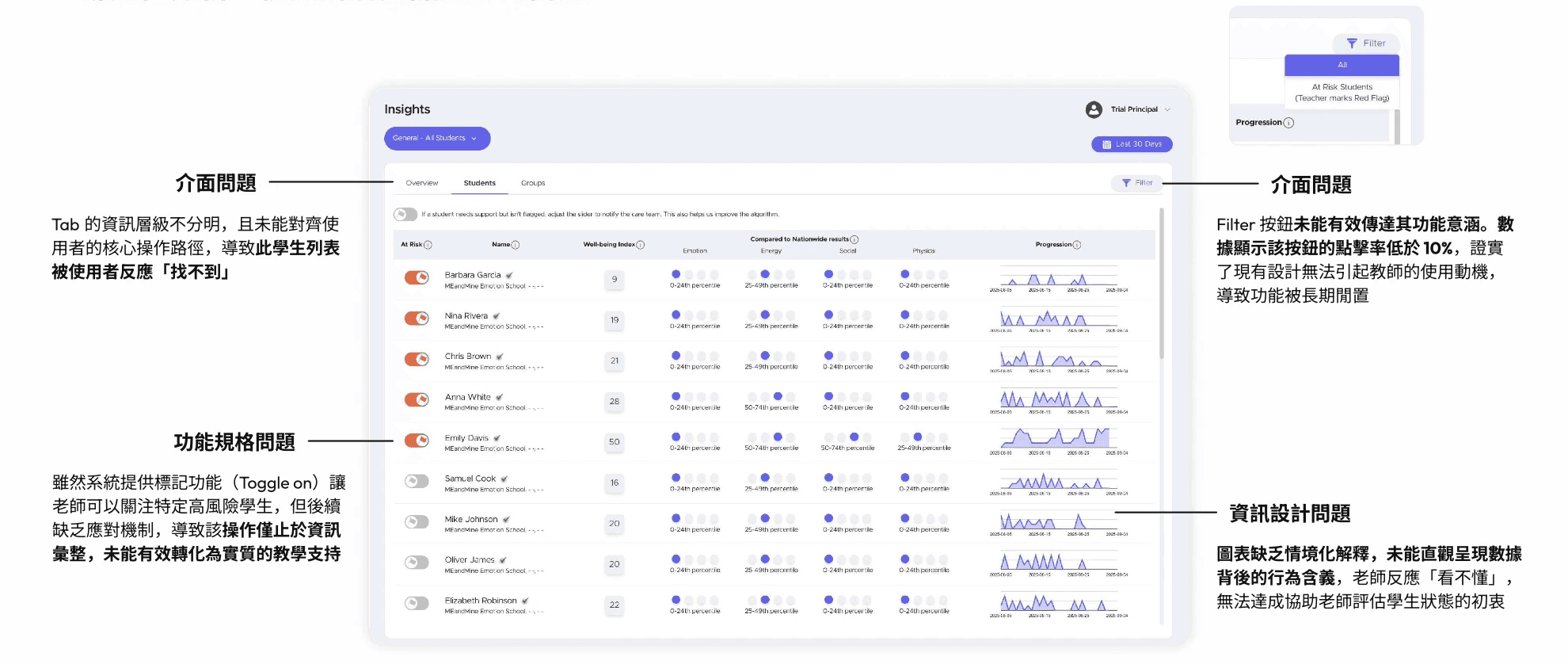
I audited the original Student View and identified four key issues.

The information architecture did not match the educator’s core workflow. The student list was placed under a tab structure that users found difficult to discover.

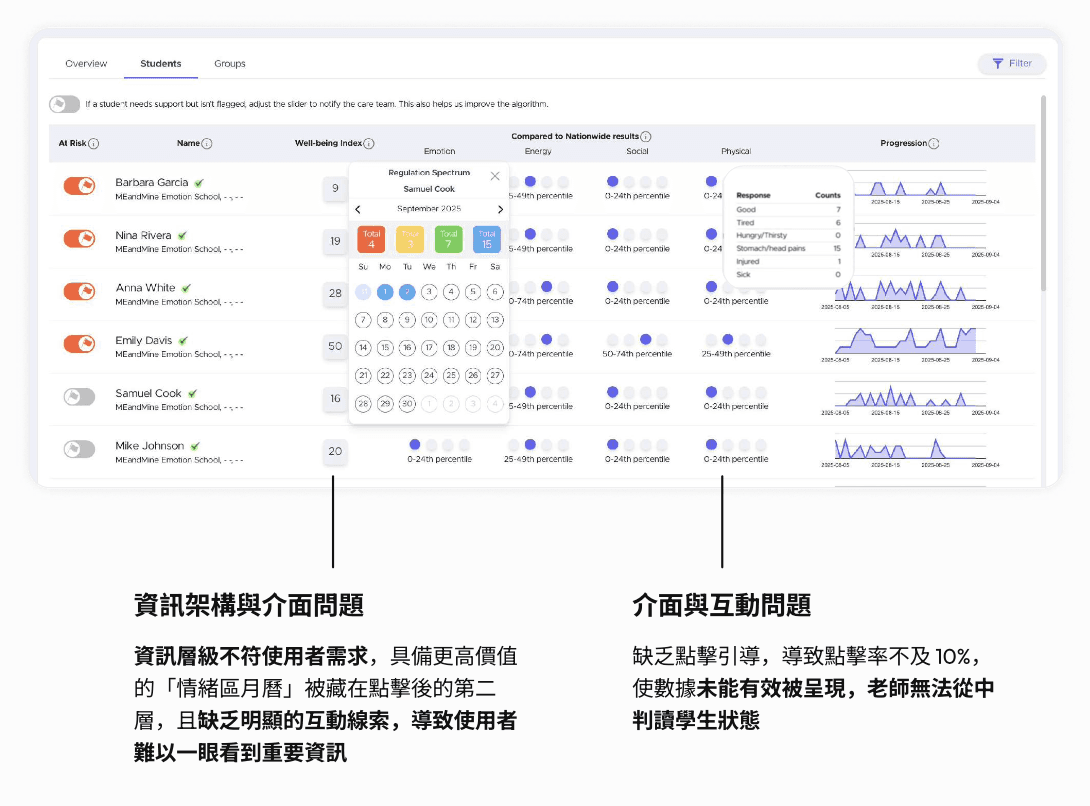
The filter interaction had a click-through rate below 10%, suggesting that users did not understand its purpose or value.

Important emotional and behavioral data was hidden behind secondary interactions, making it hard to scan student status at a glance.

The charts lacked contextual explanation, so teachers could see data patterns but struggled to interpret what those patterns meant in real student behavior.

I audited the original Student View and identified four key issues.

The information architecture did not match the educator’s core workflow. The student list was placed under a tab structure that users found difficult to discover.

The filter interaction had a click-through rate below 10%, suggesting that users did not understand its purpose or value.

Important emotional and behavioral data was hidden behind secondary interactions, making it hard to scan student status at a glance.

The charts lacked contextual explanation, so teachers could see data patterns but struggled to interpret what those patterns meant in real student behavior.

Prioritizing With Kano Model

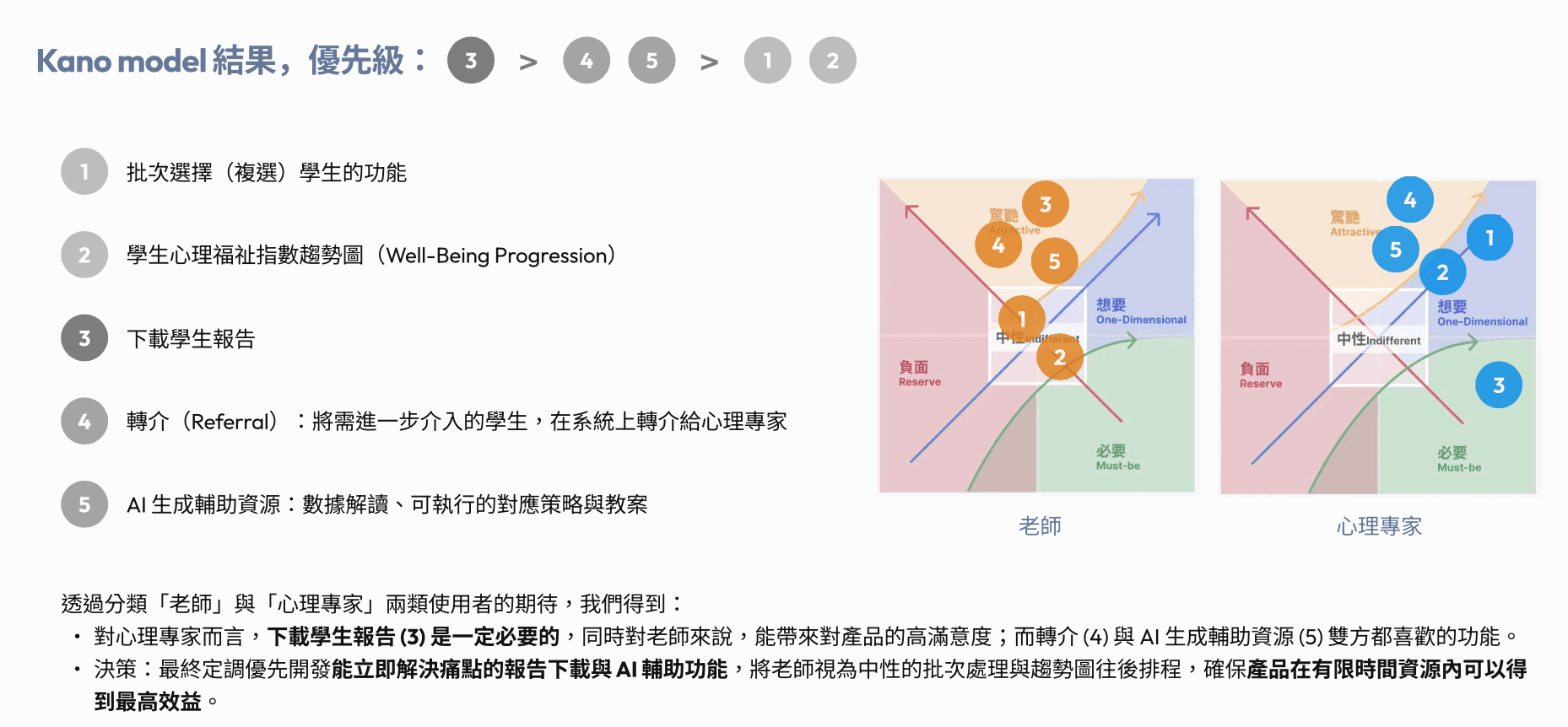
The team had multiple feature ideas on the roadmap, but limited development resources. To align priorities, I used a Kano-style evaluation with two user groups: teachers and specialists.

Instead of prioritizing based only on internal assumptions, we compared which features would solve urgent pain points, which would increase satisfaction, and which could be deferred.

The result showed that downloadable student reports and AI-generated support strategies should be prioritized first, while batch selection and progression charts could be scheduled later.

This helped the team focus engineering effort on features that created the highest immediate value.

The team had multiple feature ideas on the roadmap, but limited development resources. To align priorities, I used a Kano-style evaluation with two user groups: teachers and specialists.

Instead of prioritizing based only on internal assumptions, we compared which features would solve urgent pain points, which would increase satisfaction, and which could be deferred.

The result showed that downloadable student reports and AI-generated support strategies should be prioritized first, while batch selection and progression charts could be scheduled later.

This helped the team focus engineering effort on features that created the highest immediate value.

Solutions

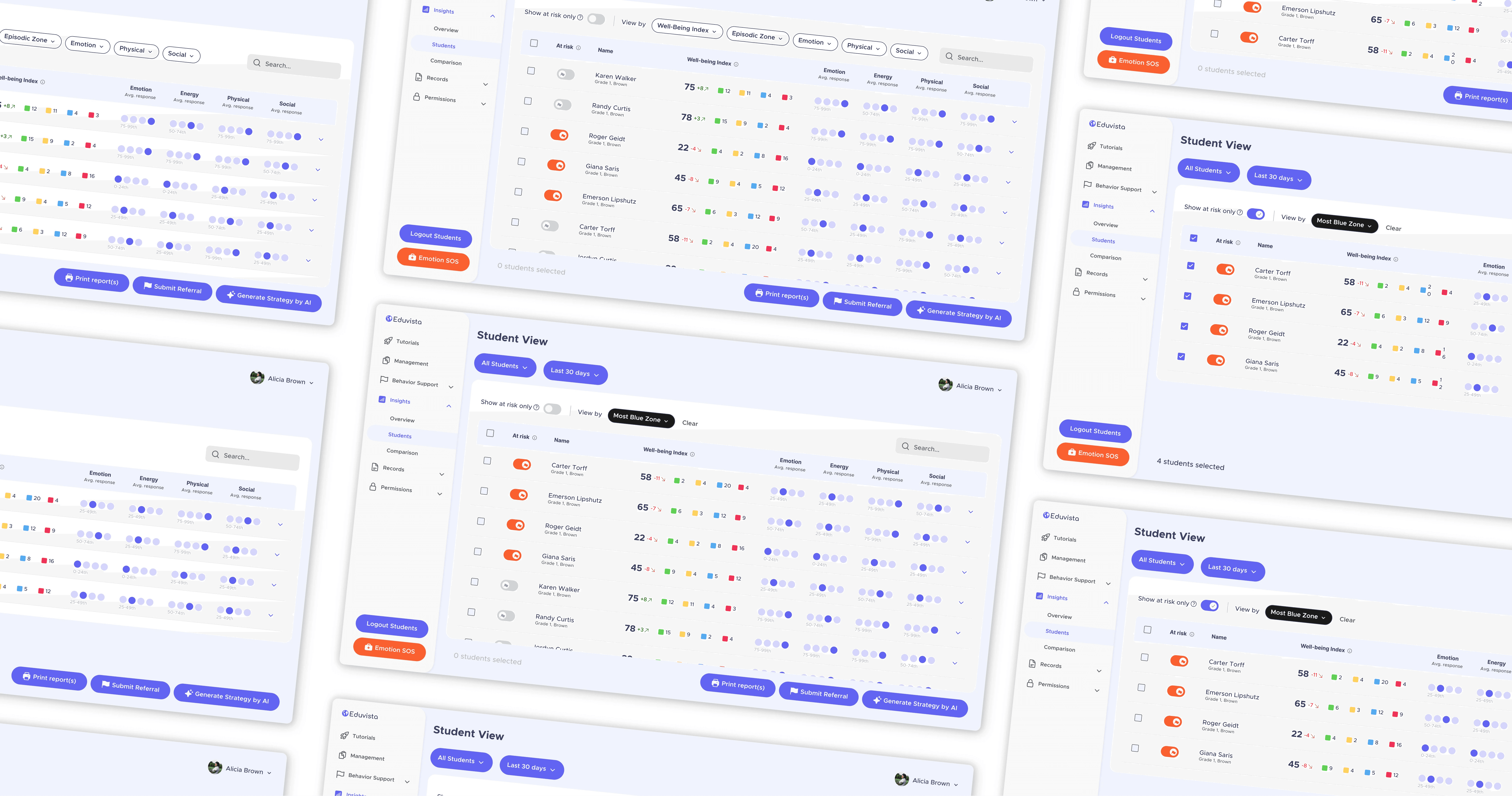
The redesign shifted the dashboard from a data-heavy monitoring page into an action-oriented support workflow.

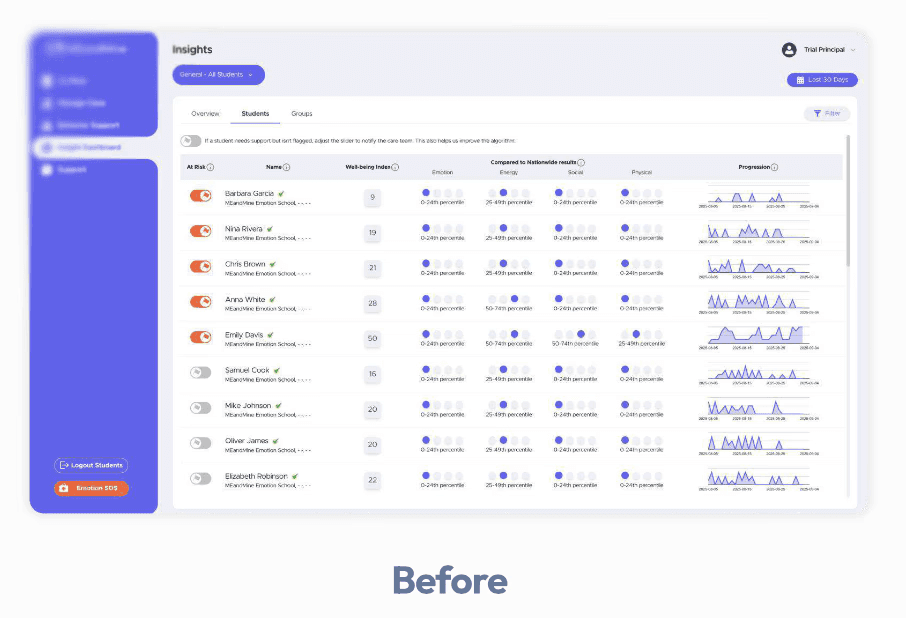
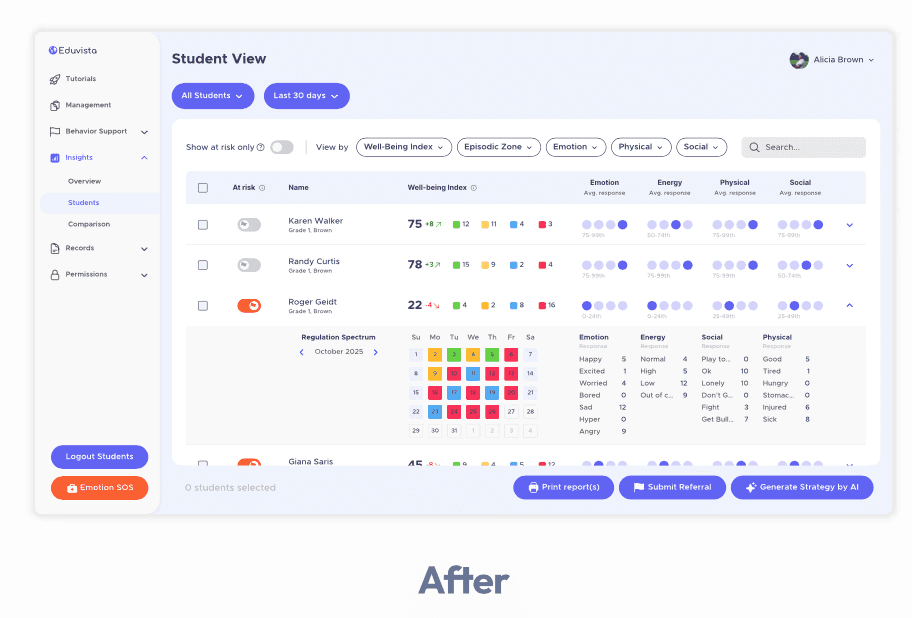
Before, educators could see student data, but important actions were unclear or disconnected.

After, teachers could identify at-risk students faster, understand the reason behind each student’s status, and choose a next step directly from the same interface.
#1: Restructuring The Dashboard

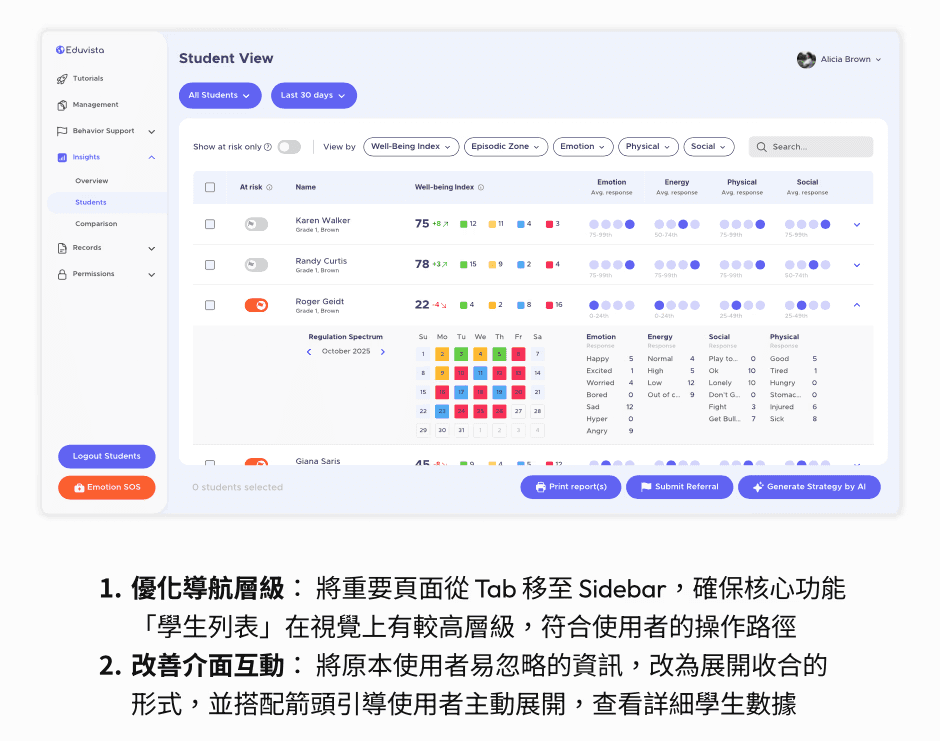
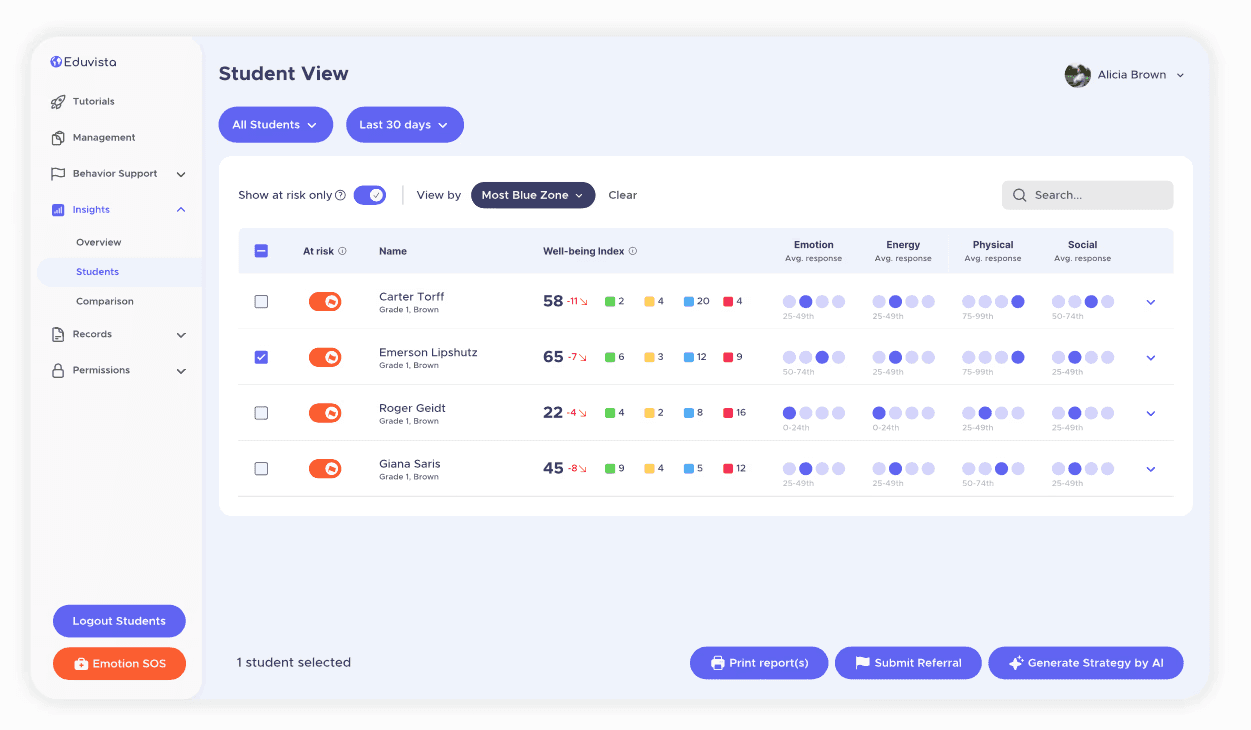
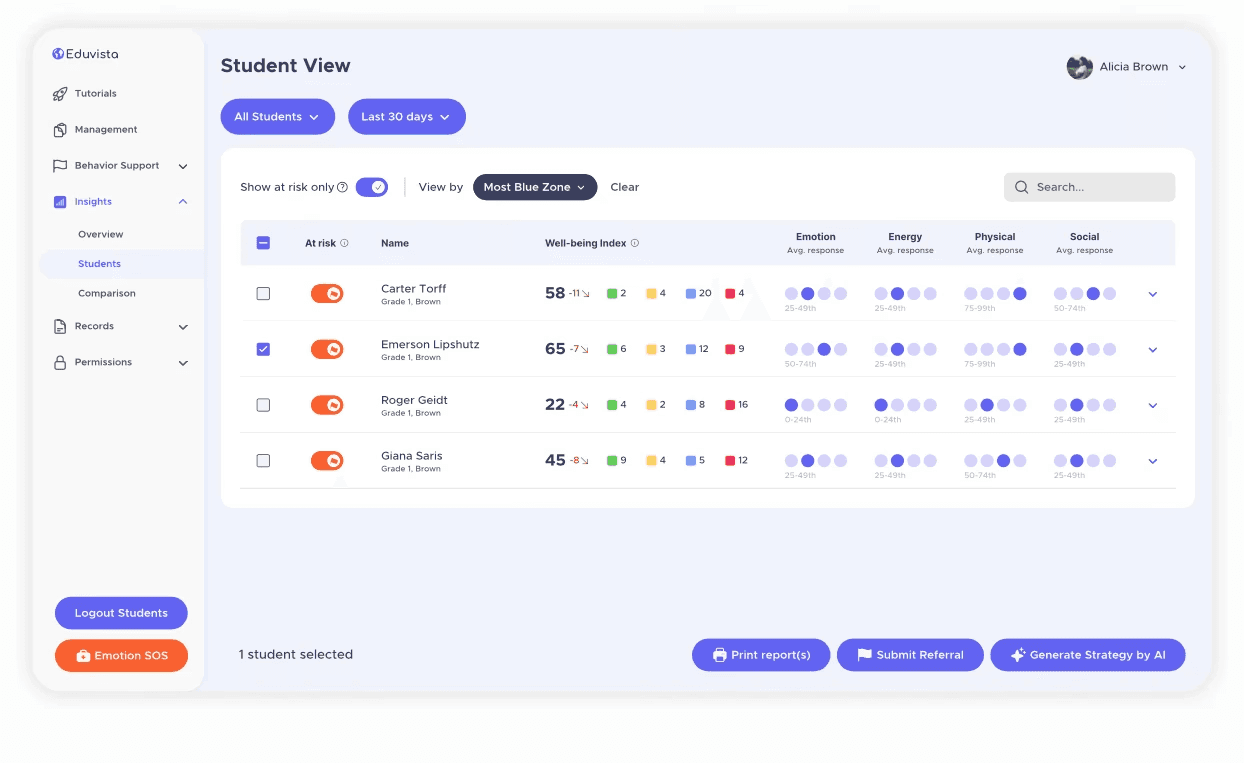
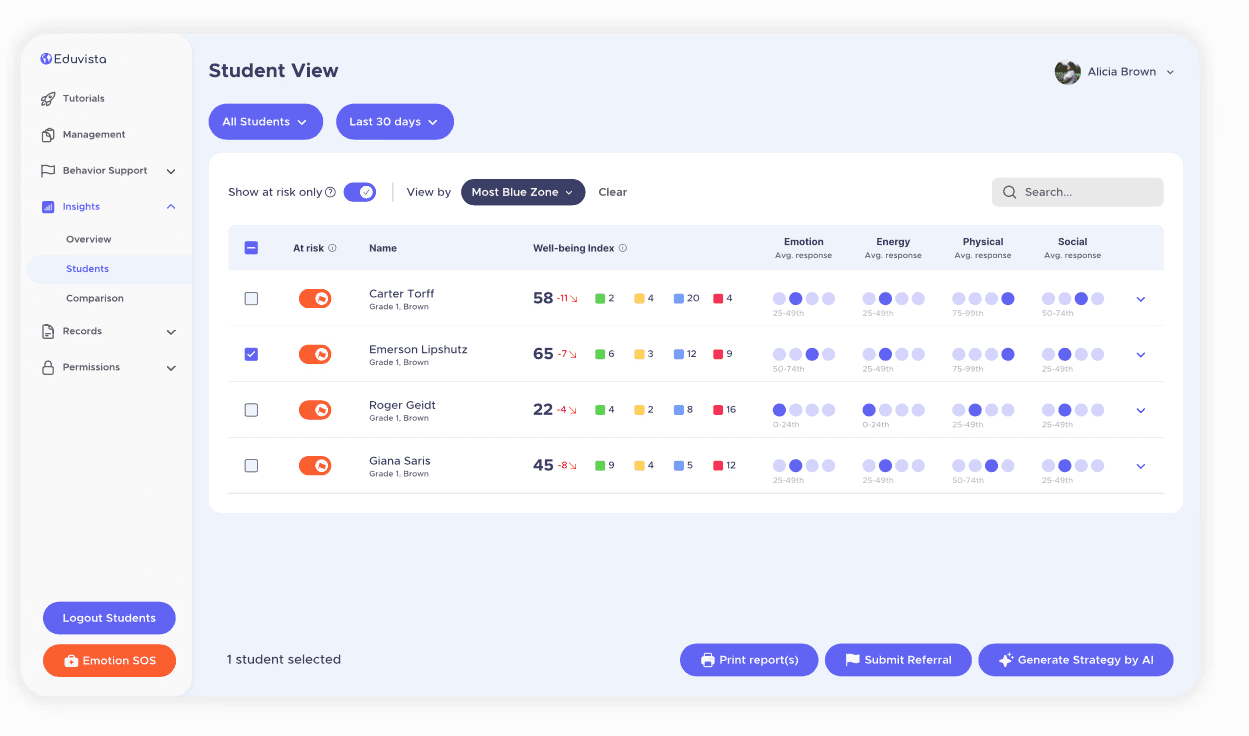
I redesigned the Student View around the teacher’s primary task: identifying students who need support.

The student list was moved into a clearer sidebar navigation structure, giving it stronger visual hierarchy and making it easier to access.

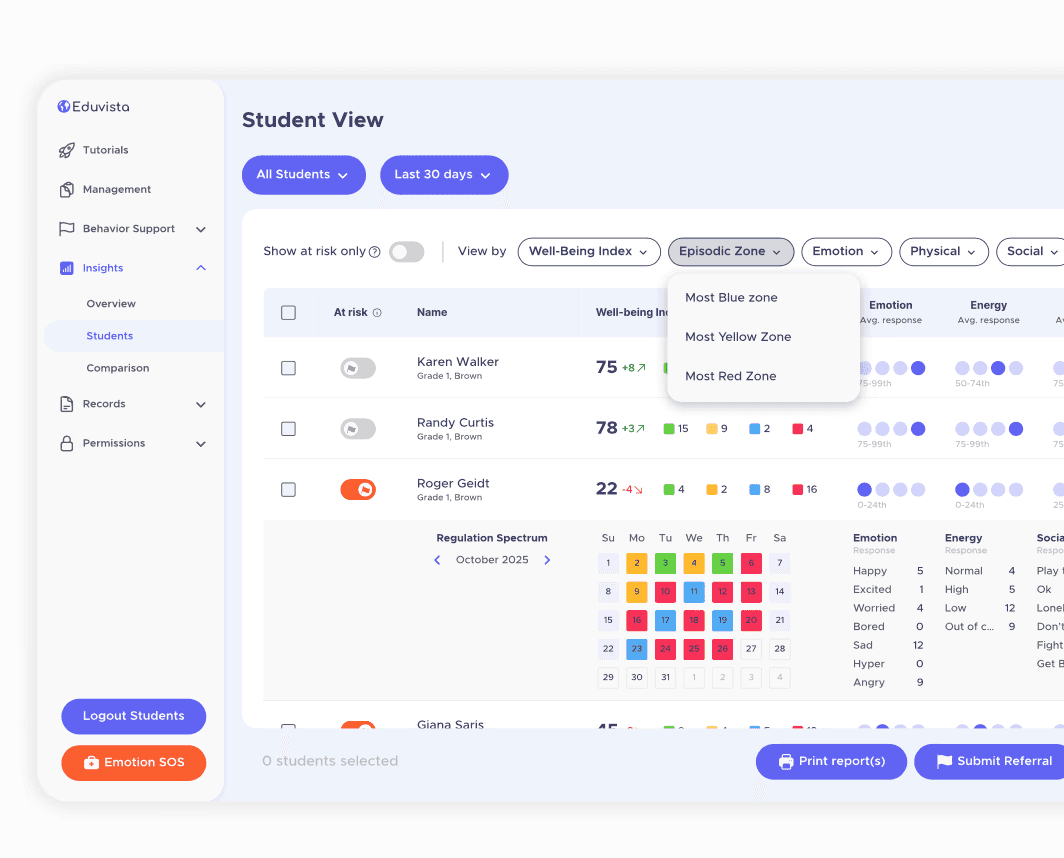
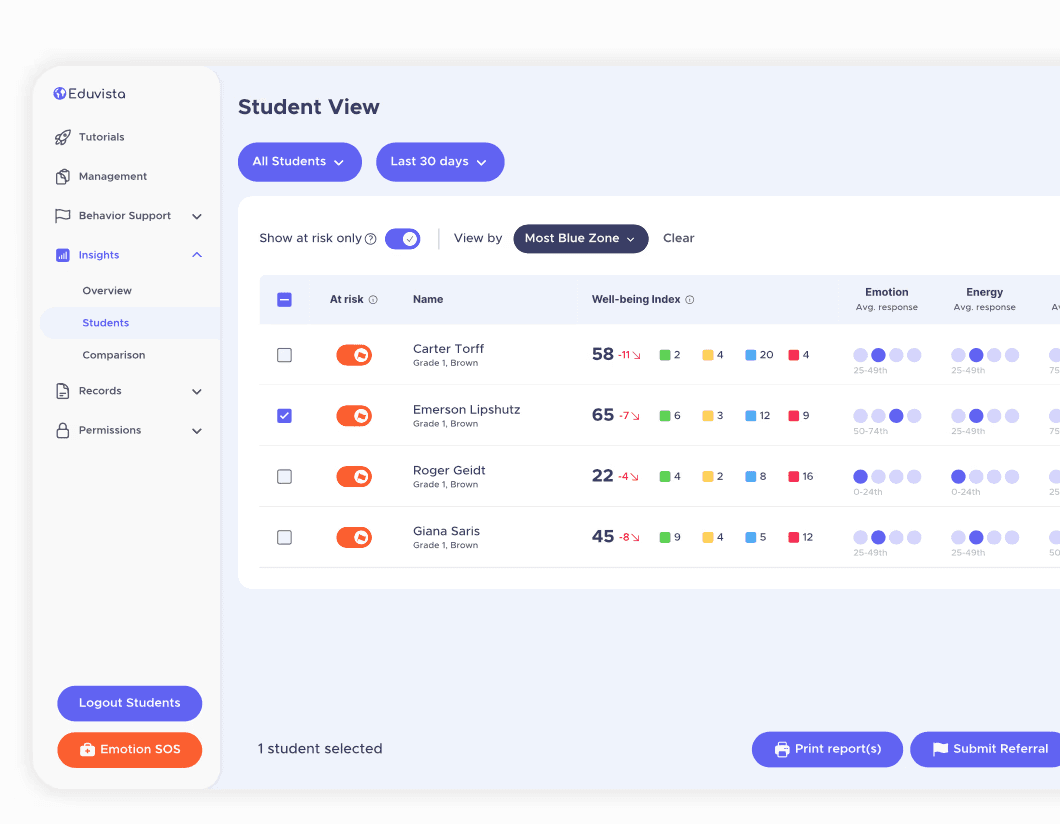
I also replaced the original low-performing filter with a more intuitive “Show at risk only” toggle. Instead of asking users to understand a vague filter button, the new interaction directly reflected the action teachers wanted to take.

Sorting options were also redesigned to help educators quickly surface students by well-being index or risk zone.

#1: Restructuring The Dashboard

I redesigned the Student View around the teacher’s primary task: identifying students who need support.

The student list was moved into a clearer sidebar navigation structure, giving it stronger visual hierarchy and making it easier to access.

I also replaced the original low-performing filter with a more intuitive “Show at risk only” toggle. Instead of asking users to understand a vague filter button, the new interaction directly reflected the action teachers wanted to take.

Sorting options were also redesigned to help educators quickly surface students by well-being index or risk zone.

#2: Making Data Easier To Interpret

To reduce cognitive load, I redesigned the student table with a clearer information hierarchy.

Key indicators, such as at-risk status and well-being index, were placed at the first level so teachers could scan the list quickly.

More detailed behavioral patterns were moved into expandable rows, allowing teachers to explore deeper context only when needed.

This progressive disclosure approach helped the dashboard support both fast scanning and detailed interpretation without overwhelming the first view.

#2: Making Data Easier To Interpret

To reduce cognitive load, I redesigned the student table with a clearer information hierarchy.

Key indicators, such as at-risk status and well-being index, were placed at the first level so teachers could scan the list quickly.

More detailed behavioral patterns were moved into expandable rows, allowing teachers to explore deeper context only when needed.

This progressive disclosure approach helped the dashboard support both fast scanning and detailed interpretation without overwhelming the first view.

#3: AI-Generated Teaching Strategies

One of the most important new features was an AI-assisted strategy generator.

Instead of leaving teachers with raw data, the system translated student well-being patterns into structured teaching support.

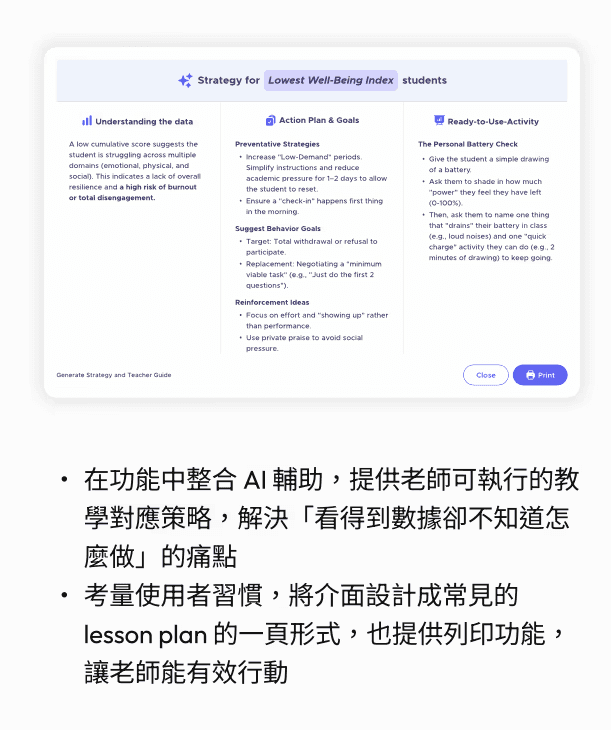
The generated strategy included data interpretation, action plans, suggested behavioral goals, reinforcement ideas, and ready-to-use classroom activities.

I designed the output format to feel familiar to educators, similar to a lesson plan or teacher guide, so the AI response could be read, trusted, and used in the classroom.

#3: AI-Generated Teaching Strategies

One of the most important new features was an AI-assisted strategy generator.

Instead of leaving teachers with raw data, the system translated student well-being patterns into structured teaching support.

The generated strategy included data interpretation, action plans, suggested behavioral goals, reinforcement ideas, and ready-to-use classroom activities.

I designed the output format to feel familiar to educators, similar to a lesson plan or teacher guide, so the AI response could be read, trusted, and used in the classroom.

#4: Referral Workflow

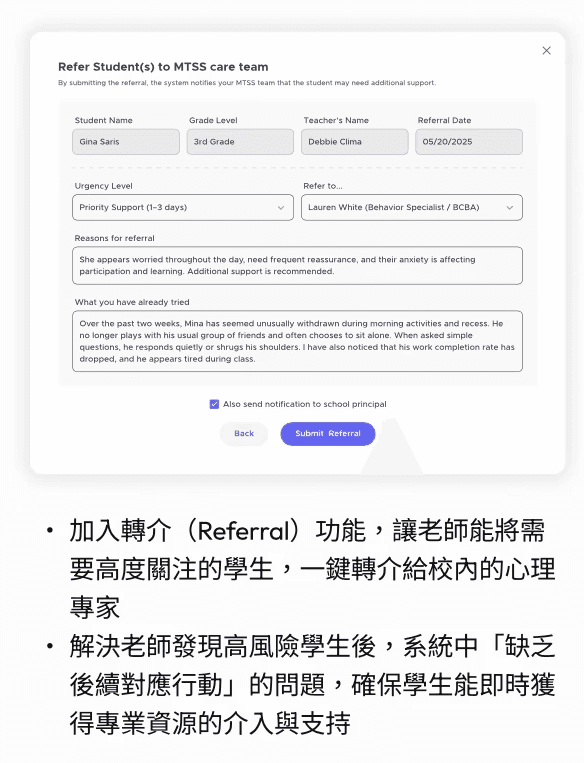
For students who required additional support, I designed a referral workflow that allowed teachers to submit a case directly to the school’s specialist team.

The form carried key student context into the referral process, including student information, urgency level, reason for referral, and what the teacher had already tried.

This helped solve a critical gap in the original workflow: teachers could identify high-risk students, but there was no clear next step for professional intervention.

#4: Referral Workflow

For students who required additional support, I designed a referral workflow that allowed teachers to submit a case directly to the school’s specialist team.

The form carried key student context into the referral process, including student information, urgency level, reason for referral, and what the teacher had already tried.

This helped solve a critical gap in the original workflow: teachers could identify high-risk students, but there was no clear next step for professional intervention.

#5: Printable Student Report

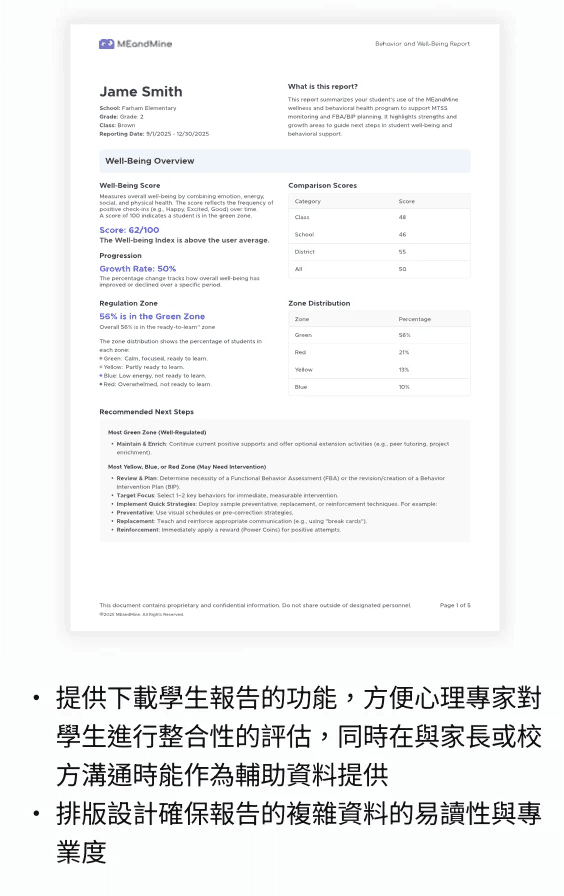
I also designed a printable student well-being report for specialists, school teams, and parent communication.

The report transformed dashboard data into a structured document, including well-being overview, comparison scores, zone distribution, and recommended next steps.

The goal was to make complex student data easier to review, share, and act on across different stakeholders.
Validation

After reviewing the redesigned workflow, educators responded positively to the clearer filtering logic and action-oriented features.

“This is exactly what I need. I’ll definitely use the filters.”
— Debbie, Gen ED Teacher

“It’s much more intuitive. Now I know what the next steps are for my students.”
— Jessica, Consultant

Impact

The redesign improved the product in three key ways.

It made high-risk students easier to identify through clearer filtering, sorting, and hierarchy.

It turned complex well-being data into actionable workflows through AI-generated strategies, referrals, and reports.

It helped the team align product priorities around features that delivered the most immediate value to educators and specialists.

Reflections

This project taught me that designing for complex systems is not about showing more data. It is about helping users make better decisions with less friction.

By combining information architecture, feature prioritization, AI-assisted workflows, and close engineering collaboration, I helped transform a complex student dashboard into a clearer support system for educators.

For me, this project also reinforced what I value most as a product designer: working beyond the screen, understanding the logic behind the product, and designing experiences that help users move from insight to action.

I’m Lena, let’s work together

p4532.1995@gmail.com

I’m Lena, let’s work together

p4532.1995@gmail.com